Earnings and payouts
Earnings shows what your team has earned across the platform, the statements behind it, and the payouts Jest has sent. Open it from the team Dashboard.
Earnings, statements, and payouts are visible to team admins only. Every member can see what an individual app sold, on that app's Financials tab.
How a sale splits
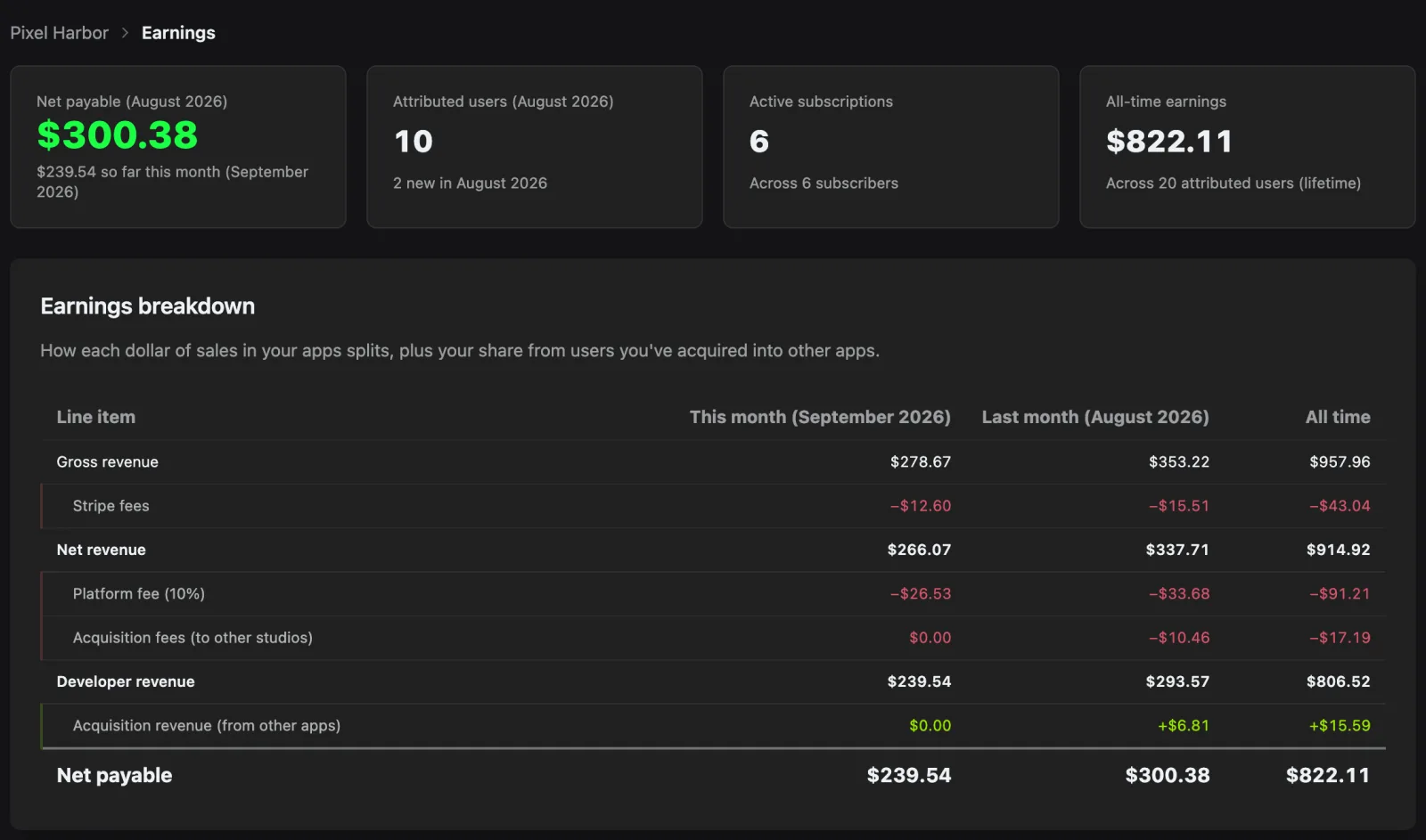
Every transaction in one of your apps is split the same way, along the lines set out in Jest's economic model. The breakdown runs that split line by line, for this month, last month, and all time.
| Line item | What it is |
|---|---|
| Gross revenue | What users paid in your apps. |
| Stripe fees | What the payment provider charged to process those payments, estimated where the fee is not yet known. |
| Net revenue | Gross revenue after payment fees, across sales in your own apps. The platform fee, acquisition fees and developer revenue are shares of it. Acquisition revenue is not — it is earned on sales in other teams' apps. |
| Platform fee (10%) | Jest's cut. |
| Acquisition fees (to other studios) | 20% of net revenue on sales to a user another team acquired. |
| Developer revenue | Your publishing share: 70% of net revenue, or the full 90% on sales to users nobody else acquired. |
| Acquisition revenue (from other apps) | Your 20% on what users you acquired spent in other teams' apps. |
| Net payable | What Jest owes you for the period. |
A user counts as acquired by the team whose attribution link or app they registered through, and that claim lasts 12 months. It is not exclusive for the whole period: if the user goes inactive and is later acquired again, the newer acquisition takes over the share from then on. Acquire a user into your own app and you keep both shares — the split is the same, you're just on both sides of it. For how Jest decides which team acquired a user, see internal registration attribution.
Earnings by app and user activity
Earnings by app breaks your developer revenue down per app, over the same three periods, including acquisition fees you kept on your own sales. It does not include acquisition revenue earned in other teams' apps, which has no app of yours to attribute to, so it will not add up to net payable. Each app links through to its own Financials tab.
User activity counts the users attributed to your team:
- New users (studio ad) — users credited to you by your tracking ID. Every attribution link counts here, whichever app it points at.
- New users (app acquisition) — users credited to you because they registered inside one of your apps, with no tracking ID in play.
- Attributed users — users still attributed to you at the end of the period whose revenue-share window overlapped it, whether or not they spent anything. A window that ran out partway through the month still counts; a user another team re-acquired before the month ended counts for that team instead.
Monthly statements
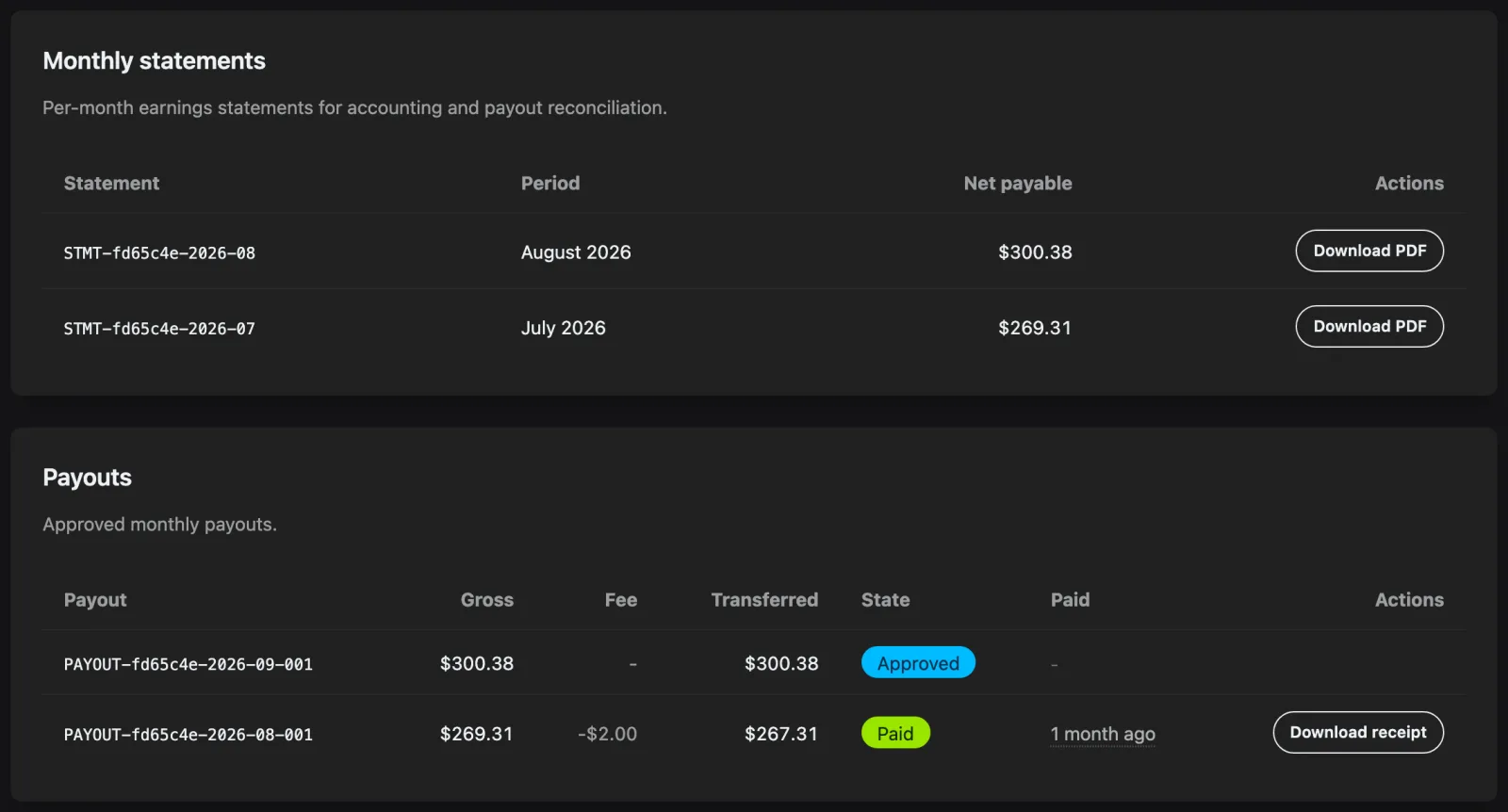
Jest closes each month and generates a statement for it in the first days of the following month. A statement is a fixed record: it carries the period, the net payable for that period, and a PDF you can download for your accounts.
Months where nothing was payable and nothing was earned don't produce a statement.
Payouts
Payouts are monthly and follow the statements. A payout appears once your accrued statement total clears the $100 minimum — below that, the balance rolls into the next month.
A payout records the amount, the processing fee deducted from it, and what was transferred, and moves through these states:
- Pending review — raised for the period and waiting on the Jest team.
- Approved — cleared for payment.
- Processing — on its way to your bank.
- Paid — sent by the payout provider. Your bank may still be processing it. Download a receipt from the row.
- Rejected or failed — something went wrong; contact the Jest team.
Set up payouts
Payouts need bank details before anything can be transferred. An admin sets these up under Team Settings > Payout Setup, by picking a country of business or residence and filling in the form that follows, which is hosted by Stripe, our payout provider. Leaving partway through is fine — the card offers Resume setup.
Once Stripe verifies the account, the card confirms that payouts are active and where they'll land. Use Update bank details to change the destination later.
If your country isn't in the list, Stripe doesn't support automatic payouts there yet — contact the Jest team to arrange a manual transfer.