Jest Ads
Jest Ads is in beta. Campaigns can only deliver once your account has ad credits. There are two ways to get them: get accepted into the Jest Apps Fund or receive an invitation from Jest, which we're extending to a small number of select developers. See the Jest Apps Fund for details and how to apply.
Overview
Jest Ads is Jest's ad network. Bid for ad placements across Jest and pay only when a player enters your app.
Everything happens in Ads Manager in the Developer Console: set your bid and daily budget, choose or upload a creative, and activate your campaign. No sales call, media plan, or minimum spend.
In beta, there's a single placement: the top card in Explore. More surfaces are coming soon and will use the same budgets and tools.
Why we built it
A lot of discovery on Jest happens through Explore. Organic ranking is great at rewarding apps that are already performing well, but that can make it harder to get your first players.
Jest Ads gives you a way to put your app in front of players while you're building organic momentum.
We also built Ads around what matters on Jest: entries, not impressions. You don't pay just because someone sees your ad. You pay when a player actually enters your app from it.
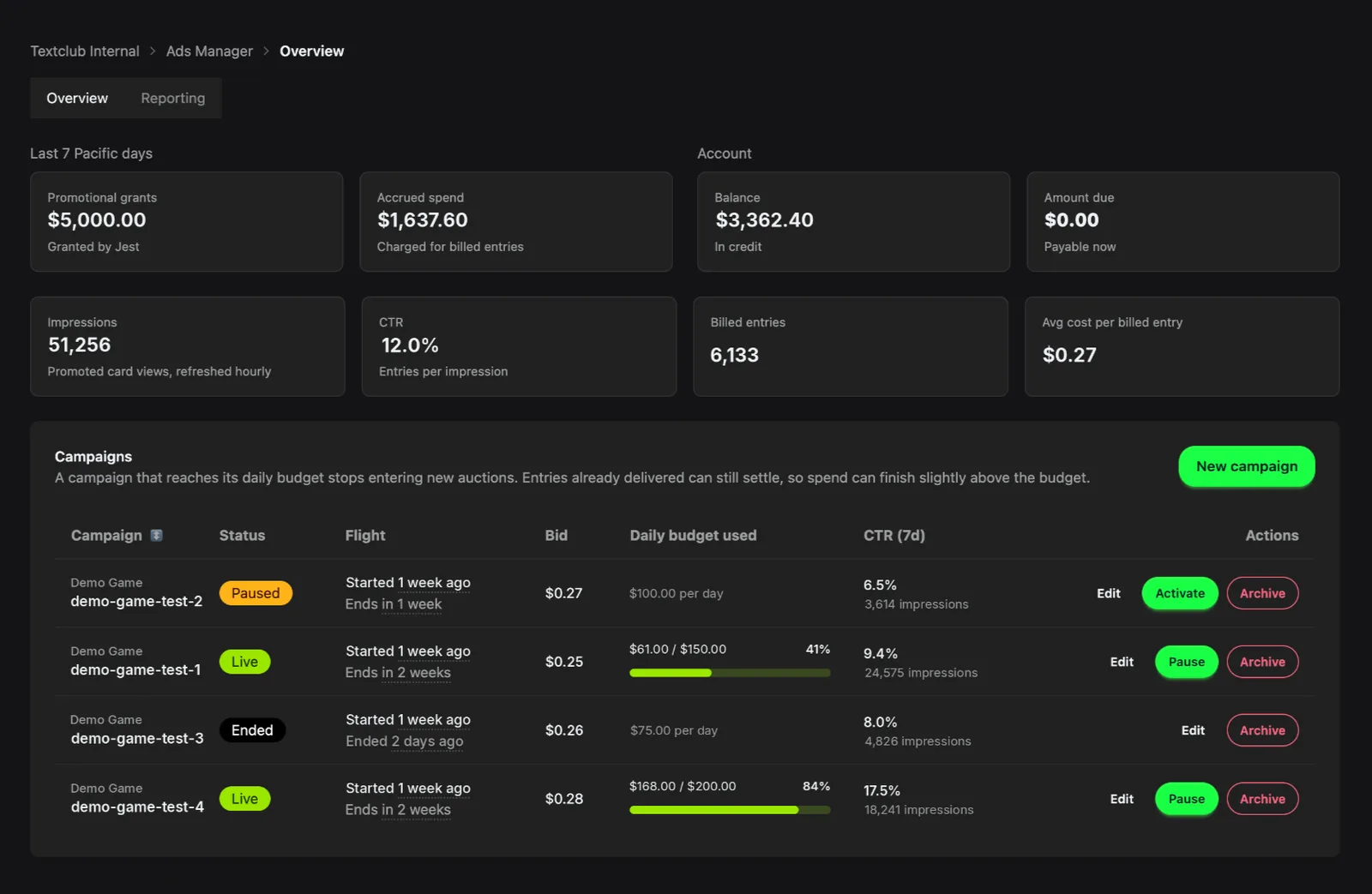
Where your ads run
In beta, there's one placement: the first card in Explore, marked Promoted. Everything else in the feed remains organic.
Who sees your ad
Anyone browsing Explore can see promoted cards, including signed-in players and guests, whether or not they've played your app before.
There are two exceptions:
- Players who already entered your app that day aren't eligible. This prevents you from paying to re-acquire players who have already played that day.
- Sandbox users never see promoted cards, meaning you can't preview your live ad from a sandbox account.
One campaign fills the promoted placement per Explore load. If no eligible campaign is available, the placement falls back to organic content.
Create a campaign
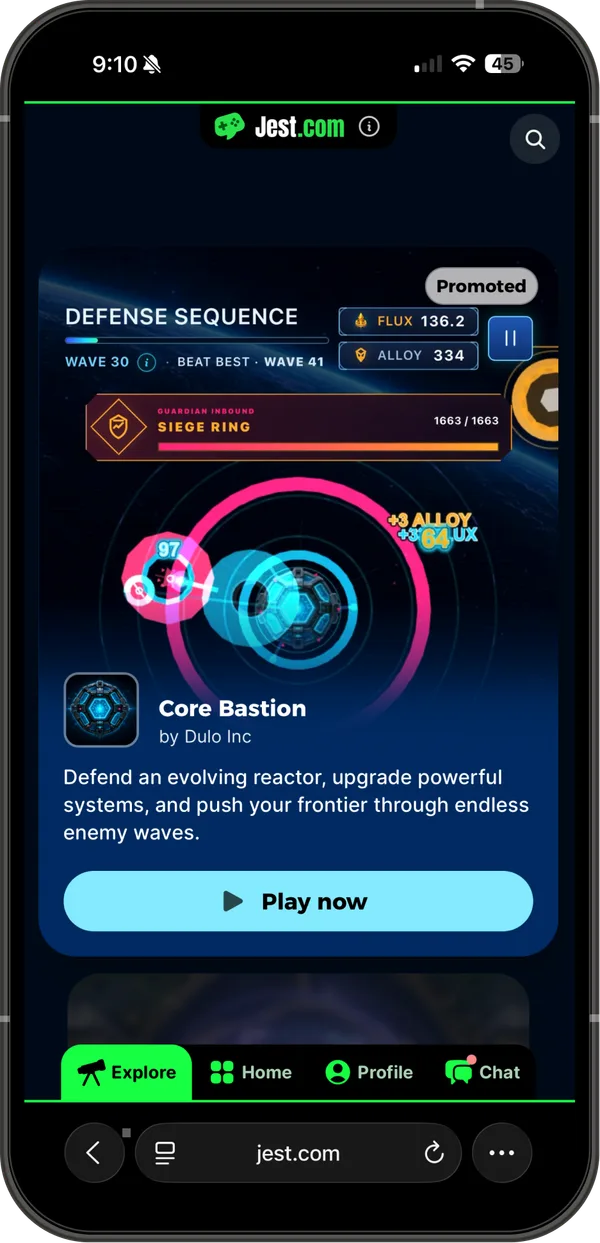
In Ads Manager, choose New campaign. Creating and editing campaigns requires billing write access on your team. Viewing campaigns and reporting requires billing read access.
- App - Any published, approved app on your team with an active build. Apps that don't meet all three don't appear in the picker. This can't be changed after the campaign is created.
- Campaign name - Up to 100 characters and unique within your team.
- Creative - Choose an image or video, then select an approved showcase asset. Leave this empty to use your app's hero image or video. The ad card is tall and portrait, and your creative is cropped to fill the card from the top down. Portrait assets work best; keep important content in the upper two thirds.
- Custom text - Optional, up to 110 characters.
- Entry payload - Optional JSON object delivered to your app when a player enters from the campaign. See Entry payload.
- Start and end date - Dates use Pacific Time. The start date begins at 12:00 AM and the end date runs through 11:59 PM.
- Bid per entry - Minimum $0.25. This is the amount you pay for each billed entry.
- Daily budget - Must be at least your bid. Resets at midnight Pacific Time.
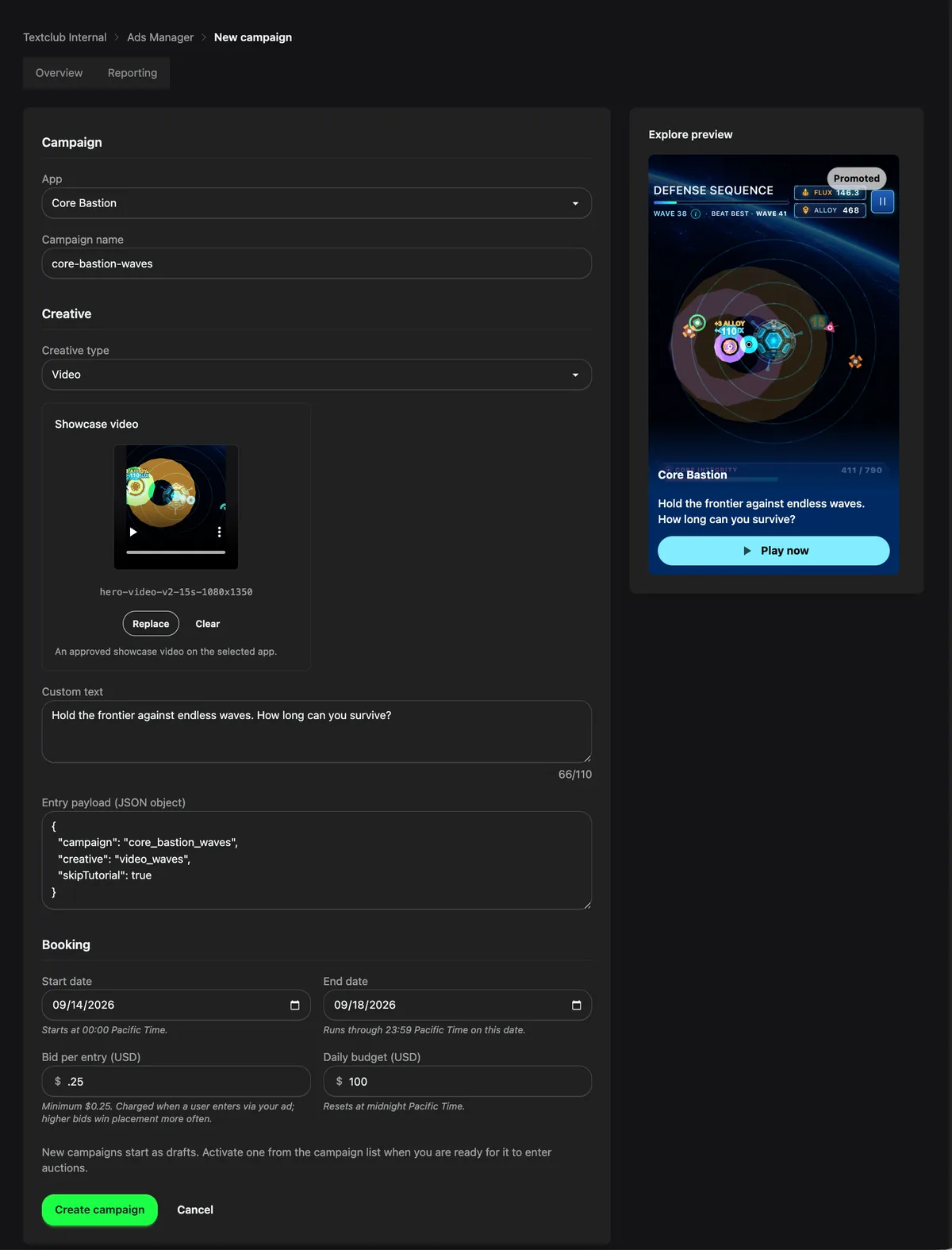
New campaigns start as Drafts. Activate a campaign from the campaign list and it becomes Live, or Scheduled if its start date is in the future.
You can pause and resume a campaign any time before its end date. After that it shows as Ended and the pause and activate actions disappear, though editing the end date brings it back. Archiving stops delivery and editing but keeps the campaign available in reporting.
Pausing or archiving stops new delivery. Entries already in progress can still settle.
What you pay
Your bid is the amount you pay for each billed entry, never more. A view that doesn't lead to an entry costs nothing.
A higher bid can make your campaign more competitive for the placement. It also raises what you pay for each billed entry, because you always pay your own bid.
Editing a bid applies to future delivery. An ad that has already been shown settles at the bid it was served with, so a change can take up to 30 minutes to be reflected in what you're charged.
A billed entry is a registered player entering your app from your ad, counted once per player, per app, per Pacific day.
The following entries aren't billed:
- Guests - An unregistered player can enter your app from your ad and you pay nothing. If they register later in that session, the entry stays free.
- Repeat entries - You're charged at most once per player, per app, per day, so a second entry from your ad the same day is free.
- Late or cross-session entries - An entry more than 30 minutes after the ad was shown, or from a different session, isn't attributed to your campaign, so it isn't billed and doesn't count as an entry in reporting. The impression it came from still counts, so these entries lower your CTR.
Your daily budget controls how much new delivery a campaign gets in a billing day. Once another bid would exceed the budget, the campaign stops delivering for the day. It isn't a strict cap: ads already shown can still convert after delivery stops, so a day can finish above its budget, and by more when a lot of ads were in flight.
The campaign list shows today's spend and whether a campaign has stopped because it reached its daily budget or because the account has insufficient credit.
During beta, accounts run on credits granted by Jest. The Overview tab shows your grants, spend, balance, and amount due. Delivery pauses account-wide once the next bid would take your balance past the account's limit, so it stops a bid short of that limit rather than at it, and resumes when the account is topped up.
Entry payload
An ad entry isn't quite the same as a normal entry: the player just saw a specific creative making a specific promise, and then arrives in your app with that context.
An entry payload lets your app respond to that context. For example, you can send a player directly into the game mode featured in the ad, shorten a tutorial for players arriving from a campaign, or tag the cohort in your own analytics. This is the same entry payload used in other parts of the Jest ecosystem such as notifications or referrals (see Entry payload).
For example, you could set a payload such as:
{
  "campaign": "spring_boss_rush",
  "mode": "boss_rush",
  "skipTutorial": true
}
And then can be consumed in your app via the SDK:
const { campaign, mode, skipTutorial } = JestSDK.getEntryPayload() as {
  campaign?: string;
  mode?: string;
  skipTutorial?: boolean;
};
Campaign payloads must be a JSON object of at most 4096 characters when serialized and no more than five levels deep. promo is reserved: Jest sets it to a copy of your payload so that older games keep working, so anything you put under that key is replaced.
For more on reading entry payloads in your app, see JestSDK.getEntryPayload().
Measure results
The Reporting tab in Ads Manager shows impressions, CTR, billed entries, and spend by billing day. View all campaigns or filter to a specific campaign, over the last 7, 30, or 90 days.
Reporting uses whole Pacific billing days so the data lines up with your daily budget resets. Archived campaigns remain available in the campaign picker.
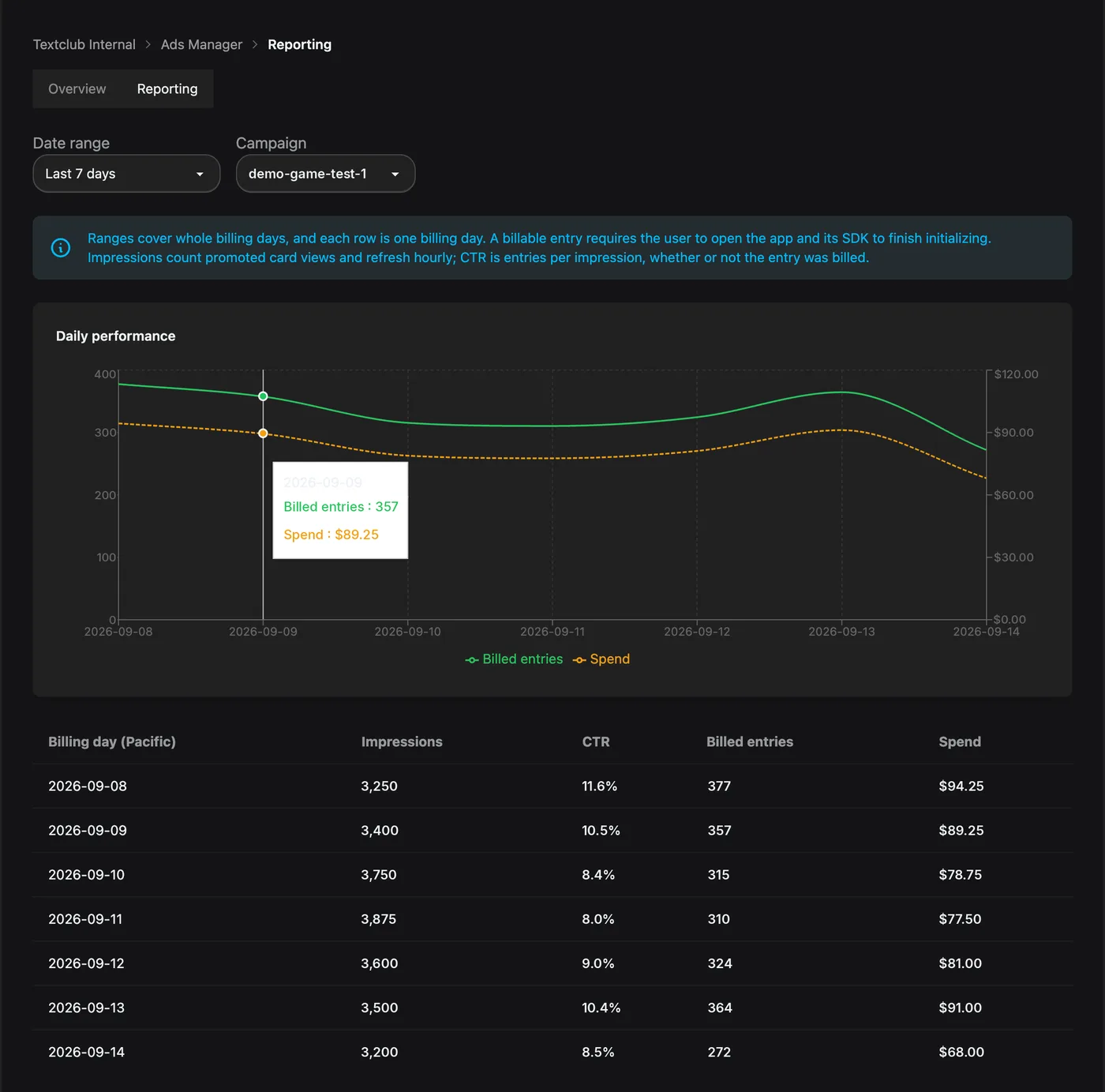
Impressions refresh hourly rather than in real time.
One important detail: CTR counts every entry from your ad, whether or not it was billed. It will usually run higher than your billed entries suggest, because guest entries count too and they're free.
Why isn't my campaign serving?
Check these first:
- The campaign is Live, not Draft, Paused, Scheduled, or Ended.
- Today's spend still leaves room for another bid within the daily budget, and your account has available credit.
- Your ad account isn't suspended. Ads Manager shows a banner when it is, and no campaign can enter an auction until it's resolved — contact the Jest team.
- Your app is published and approved, isn't archived, and has an active build.
- Your creative is still an approved showcase asset and hasn't been archived. Archiving it in the Image Library takes the campaign out of delivery. Showcase assets can't be swapped in place, so a re-upload is a new asset that you need to select on the campaign.
- You're not checking from a sandbox account.
- You haven't already entered the app today.
If everything checks out, remember that delivery is shared across campaigns - a handful of Explore loads isn't a representative sample of how often your campaign will serve.
What's coming
Explore is the starting point. We're building toward a network that reaches players across Jest:
- In-app placements (IAA) - Reach players during a game session through interstitials, rewarded placements, and other in-game inventory.
- More platform surfaces - Reach players in more places across Jest as they discover and engage with apps.
- More controls - Get more ways to manage who sees your ads and how you spend, beyond bids and budgets.
New placements will be managed through the same Ads Manager, campaigns, and budgets you're already using. We'll continue expanding Jest Ads throughout the beta.