Subscriptions
The Jest platform allows developers to sell recurring subscriptions to their apps using the payments SDK methods. Subscriptions complement one-off product purchases and are a good fit for things like premium tiers or access to additional content.
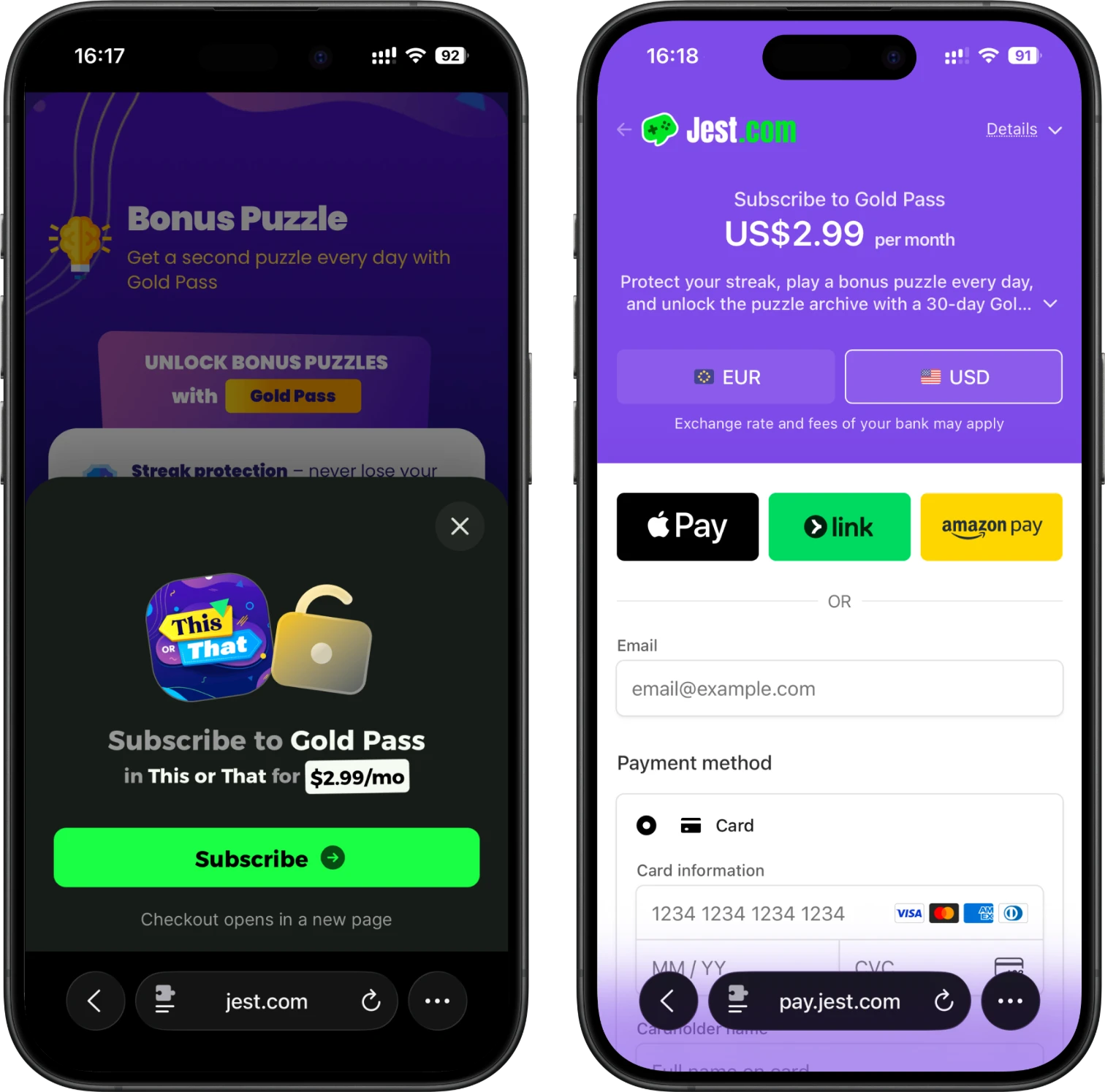
As with one-off purchases, Jest handles the entire checkout and recurring billing with the user via popular digital wallets (Apple Pay, Google Wallet, card on file). Your app is responsible for reading the user's current entitlement and unlocking the relevant features.
How subscriptions differ from products
Unlike one-off product purchases, subscriptions:
- Are tied to the user's wallet, not a single transaction. The wallet is what's billed on the recurring schedule.
- Don't require a
completestep. The platform manages the billing lifecycle; your app only needs to read the wallet's current entitlement on startup (and after a subscription purchase succeeds) and unlock features accordingly. - Can be listed by anyone, but only registered users can subscribe. Guests see the catalog and are prompted to register when they try to subscribe.
- Are returned alongside their current
status(activeorinactive), so the same response tells your app both what's on offer and what the user already has.
Subscription lifecycle
A subscription represents an ongoing entitlement granted to a wallet for as long as billing succeeds.
- On startup, list subscriptions to read the catalog and the wallet's current entitlement.
- Unlock subscription-gated features based on each subscription's
status. - If the user chooses to subscribe to an inactive offering, start a subscription with the subscription's SKU.
- If checkout succeeds, the SDK returns the now-active subscription. Apply the entitlement in your app.
- Cancellations, expirations, and renewals are handled by the platform; the next subscription list will reflect the updated
status.
Every subscription SKU is an independent product — the platform does not relate SKUs that unlock the same thing (e.g. a monthly and a yearly cadence of one tier). Once a user has an active subscription, your app must not offer other subscriptions that grant the same entitlements: hide or disable those offers, or the user could end up paying for both.
Happy path (new subscriber)
Returning subscriber (startup reconciliation)
On every startup, your app should re-read the subscription list and apply the resulting entitlements. This is how you reflect cancellations, expiries, and renewals that happened while the user was away.
Free trials
A subscription can offer a free trial, configured per-product in the Developer Console (see Manage subscriptions). Trials are handled entirely by the platform — you don't run the trial yourself.
What this means for your app:
- During the trial the subscription's
statusis"active", exactly like a paid subscription. Readstatusand unlock features as usual; don't special-case trials. - A trial is granted only to wallets that have never subscribed to that product before. Returning subscribers are billed immediately. Starting a subscription applies the trial automatically when the user is eligible.
- At the end of the trial the platform charges the user and recurring billing continues. If the user cancels during the trial, the entitlement stays
"active"until the trial ends, after which the next subscription list reflects"inactive".
Showing the right call to action
SubscriptionData includes a trialEligible flag so your subscribe CTA can promise a trial only when the user will actually get one. It is true when the product has a trial configured and the wallet has never subscribed to it before; otherwise it is false (no trial configured, the user already used it, or they are currently entitled).
Use it to pick the copy on an "inactive" offer — for example "Start free trial" when trialEligible is true, versus "Reactivate" or "Subscribe for $9.99/mo" when it is false. It does not change what starting a subscription does; the platform still applies the trial only to eligible wallets. Treat trialEligible as display-only and don't gate entitlement on it.
Introductory offers
A subscription can offer an introductory price — a discounted price for the first N months, configured per-product in the Developer Console (see Manage subscriptions). Like trials, intro offers are handled entirely by the platform: eligible users pay the discounted price for the configured months and then transition to the standard price automatically.
What this means for your app:
SubscriptionDatacarries the offer as a single nullableintroOfferfield: the discountedpriceand thedurationPeriods(billing periods) it applies for.introOfferis non-null only when an intro offer is configured and the wallet has never subscribed to that product before — the same rule astrialEligible. If it's there, the user will get it; use it to advertise the offer ("$4.99/mo for the first 3 months, then $9.99/mo") and treat it as display-only.- It is also always
nullfor sandbox users, so intro offers never show up while you test with a sandbox account. - A subscription can have both a free trial and an intro offer. The discount window is measured from signup, trial included, but trials are capped at 14 days, so the subscriber still receives every configured discounted month after the trial ends.
Intro offers apply only to a wallet's first subscription to a product, so they can't be used to win back a cancelling subscriber. Subscribing that user to a second SKU leaves the original subscription running and bills them for both — starting a subscription only rejects checkout for a SKU the user is already entitled to. For cancel flows, use a retention discount (see Retention discounts), which applies to the subscription the user already has.
Retention discounts
A subscription can also configure a retention discount — a discounted price a current subscriber can claim once, configured per-product in the Developer Console next to the intro offer. It exists so your app can run its own retention flow when a user asks to cancel: instead of losing the subscriber, offer them the discount.
How it works:
- While a user is entitled and still eligible,
SubscriptionDatacarries the offer as a nullableretentionOfferfield (priceanddurationPeriods). Use it to phrase your pitch ("stay for $4.99/mo for the next 3 months?") and to decide whether a pitch is possible at all. - If the user accepts, claim the retention offer for the subscription's SKU. The discount is applied to their existing subscription instantly — no checkout, no new product. Their next
durationPeriodsrenewals bill at the discounted price, then the standard price returns automatically. - Each user can claim a subscription's retention discount once, and not during a free trial or while an introductory offer window is still running. When ineligible the field is
nulland the call returnsnot_eligible. Repeating the call for a subscription the user already claimed re-confirms the same discount and returnssuccess— safe to retry after an error. - Sandbox users never receive one:
retentionOfferstaysnullhowever they subscribed, and claiming a retention offer returnsnot_eligible. Test the flow in mock mode instead. - If the user declines, fall through to cancelling the subscription as usual.
- HTML5
- Unity
const { subscriptions } = await JestSDK.payments.getSubscriptions();
const sub = subscriptions.find((s) => s.sku === "premium");

// User tapped "cancel" in your UI:
if (sub?.retentionOffer) {
  // Show your pitch. If accepted:
  const result = await JestSDK.payments.claimRetentionOffer({
    subscriptionSku: "premium",
  });
  if (result.result === "error") {
    // Claiming again is safe, so offer a retry instead of cancelling a user who chose to stay.
    showRetentionClaimError(result.error);
    return;
  }
  // result.subscription reflects the post-claim state.
  return;
}
await JestSDK.payments.cancelSubscription({ subscriptionSku: "premium" });
var payment = JestSDK.Instance.Payment;

var subscriptionsResponse = await payment.GetSubscriptions();
var sub = subscriptionsResponse.Subscriptions.Find(s => s.Sku == "premium");

// Player tapped "cancel" in your UI:
if (sub?.RetentionOffer != null)
{
    // Show your pitch:
    if (await PlayerAcceptsRetentionOffer(sub.RetentionOffer))
    {
        Payment.ClaimRetentionOfferResult result = await payment.ClaimRetentionOffer("premium");
        if (result.Result == "error")
        {
            // Claiming again is safe: offer a retry instead of cancelling.
            ShowRetentionClaimError(result.Error);
        }

        // On success, result.Subscription reflects the post-claim state.
        return;
    }
}

await payment.CancelSubscription("premium");
How to use the SDK
Payload shapes
Where the SDK references SubscriptionData, it contains the fields below. Shared prose on this page uses the HTML5 field names; the Unity SDK exposes the same fields in PascalCase (Status, TrialEligible, IntroOffer, RetentionOffer, Sandbox, ...).
- HTML5
- Unity
{
  sku: string; // the subscription's SKU, configured in the Developer Console
  displayName: string; // suitable for display in your game's UI
  displayDescription: string | null; // optional short description
  price: number; // the subscription price in the currency specified in `currency`
  currency: string; // the currency (ISO 4217 code) the price is in
  billingPeriod: "weekly" | "monthly" | "yearly"; // the billing cadence
  status: "active" | "inactive"; // the wallet's current entitlement for this subscription
  trialEligible: boolean; // whether the wallet can still start this subscription's free trial
  introOffer: {
    price: number; // the discounted price, in the currency specified in `currency`
    durationPeriods: number; // number of billing periods the discounted price applies
  } | null; // null when no intro offer is configured or the wallet is not eligible
  retentionOffer: {
    price: number; // the discounted price, in the currency specified in `currency`
    durationPeriods: number; // number of billing periods, starting at the next renewal
  } | null; // null unless the wallet holds this subscription and can still claim the discount
  sandbox?: true; // present only for sandbox users and in the simulator
  estimatedRevenue: number; // the (estimated) USD share of revenue for the current billing period that the publisher will receive
}
public class SubscriptionData
{
    public string Sku;                  // the subscription's SKU, configured in the Developer Console
    public string DisplayName;          // suitable for display in your game's UI
    public string DisplayDescription;   // optional short description; null when not set
    public decimal Price;               // the subscription price in the currency specified in Currency
    public string Currency;             // the currency (ISO 4217 code) the price is in
    public string BillingPeriod;        // "weekly", "monthly", or "yearly"
    public string Status;               // "active" or "inactive"
    public bool TrialEligible;          // whether the wallet can still start this subscription's free trial
    public IntroOfferData IntroOffer;   // discounted price for the first billing periods; null when not eligible
    public RetentionOfferData RetentionOffer; // null unless the wallet holds this subscription and can still claim the discount
    public bool? Sandbox;               // present only for sandbox users and in the simulator
    public decimal EstimatedRevenue;    // the (estimated) USD share of revenue for the current billing period the publisher receives
}

public class IntroOfferData
{
    public decimal Price;           // the discounted price, in the currency specified in Currency
    public int DurationPeriods;     // number of billing periods the discounted price applies
}

public class RetentionOfferData
{
    public decimal Price;         // the discounted price, in the currency specified in Currency
    public int DurationPeriods;   // number of billing periods, starting at the next renewal
}
estimatedRevenue is an estimate and will not match your earnings exactly. The Jest Developer
Console reports the accurate amounts.
A status of "active" means the user's wallet currently has the entitlement and should have access to whatever the subscription unlocks. "inactive" means they don't have it (either never subscribed, or it has expired/been cancelled).
Set up subscriptions
Set up and price subscriptions using the Jest Developer Console.
For more information, see Manage subscriptions.
List subscriptions
If a user has ended their subscription, but it is still within their last paid billing period, it will remain "active" and be returned in the subscription list until the billing period ends.
Retrieve the subscriptions available to the user along with their current entitlement.
- HTML5
- Unity
JestSDK.payments.getSubscriptions()
// Returns a promise resolving to the subscription catalog plus the wallet's
// current entitlement status for each subscription.
const { subscriptions, signed } = await JestSDK.payments.getSubscriptions();

for (const subscription of subscriptions) {
  if (subscription.status === "active") {
    unlockFeaturesFor(subscription.sku);
  }
}
The response contains:
| Property | Note |
|---|---|
subscriptions | The array of SubscriptionData objects (see Payload shapes). |
signed | A signed JWT carrying the same subscriptions array. See below. |
JestSDK.Instance.Payment.GetSubscriptions()
var payment = JestSDK.Instance.Payment;

try
{
    Payment.GetSubscriptionsResponse response = await payment.GetSubscriptions();
    foreach (var subscription in response.Subscriptions)
    {
        if (subscription.Status == "active")
        {
            UnlockFeaturesFor(subscription.Sku);
        }
    }
}
catch (Exception ex)
{
    Debug.LogError($"Failed to load subscriptions: {ex.Message}");
}
The GetSubscriptionsResponse contains:
| Property | Note |
|---|---|
Subscriptions | The list of SubscriptionData objects (see Payload shapes). |
Signed | A signed JWT carrying the same Subscriptions array. See below. |
Guests get the full catalog too, so your app can offer subscriptions before the user registers. Their entitlement is always "inactive"; starting a subscription shows the signup gate (see Start a subscription).
Displaying prices
The way subscription prices are displayed should be based on the price, currency, and billingPeriod. currency is an ISO 4217 code which can be used to select the correct currency symbol or formatting.
Start a subscription
Start a subscription with the sku of a subscription returned by the subscription list.
The method returns one of the following results. In mock mode, you can simulate each outcome using the JestSDK debug menu.
Success
Checkout completed successfully. The returned subscription (plain and signed) is now "active" for the user's wallet.
Cancellation
The user closed or abandoned the checkout flow.
Error
One of the following error codes is returned:
internal_error- A transient error occurred. Your app may retry.invalid_subscription- The requestedskuis not available. Do not retry with the samesku. If this persists and the subscription configuration appears correct, contact support.already_subscribed- The user's wallet already has an active entitlement for this subscription. Refresh the wallet's state by listing subscriptions.guest_not_allowed- The user is a guest. The platform automatically shows a signup gate before returning this error, so your app does not need to prompt for registration — handle the error gracefully.
Any other error (for example, a timeout) should be handled by your app and may be retried.
- HTML5
- Unity
JestSDK.payments.beginSubscription({ subscriptionSku })
The returned promise resolves to one of:
{ result: "success"; subscription: SubscriptionData; subscriptionSigned: string }{ result: "cancel" }{ result: "error"; error: string }—erroris one of the codes listed above.
beginSubscription may also throw (for example, due to a timeout). Treat thrown errors as retryable.
const { subscriptions } = await JestSDK.payments.getSubscriptions();
const premium = subscriptions.find((s) => s.sku === "premium_monthly");

if (!premium || premium.status === "active") {
  // Already entitled; no need to start checkout.
  return;
}

const result = await JestSDK.payments.beginSubscription({
  subscriptionSku: premium.sku,
});

if (result.result === "cancel") {
  // Handle cancellation with UI feedback.
  return;
}

if (result.result === "error") {
  if (result.error === "guest_not_allowed") {
    // The platform already showed a signup gate; no need to prompt.
    return;
  }
  if (result.error === "already_subscribed") {
    // Re-read entitlement state and unlock features.
    return;
  }
  // internal_error / invalid_subscription: handle with UI feedback.
  return;
}

// result.result === "success"
const { subscription, subscriptionSigned } = result;
unlockFeaturesFor(subscription.sku);
JestSDK.Instance.Payment.BeginSubscription(subscriptionSku)
The method returns a Payment.SubscriptionResult with one of:
Result == "success"withSubscriptionandSubscriptionSignedpopulated.Result == "cancel"Result == "error"withErrorcontaining one of the codes listed above.
var payment = JestSDK.Instance.Payment;

try
{
    var subscriptionsResponse = await payment.GetSubscriptions();
    var premium = subscriptionsResponse.Subscriptions
        .Find(s => s.Sku == "premium_monthly");

    if (premium == null || premium.Status == "active")
    {
        // Already entitled, or offering not available; nothing to do.
        return;
    }

    Payment.SubscriptionResult result = await payment.BeginSubscription(premium.Sku);

    if (result.Result == "cancel")
    {
        // Handle cancellation with UI feedback
        return;
    }

    if (result.Result == "error")
    {
        if (result.Error == "guest_not_allowed")
        {
            // The platform already showed a signup gate; no need to prompt.
            return;
        }
        if (result.Error == "already_subscribed")
        {
            // Re-read entitlement state and unlock features.
            return;
        }
        // internal_error / invalid_subscription: handle with UI feedback
        return;
    }

    // result.Result == "success"
    var subscription = result.Subscription;
    var subscriptionSigned = result.SubscriptionSigned;
    UnlockFeaturesFor(subscription.Sku);
}
catch (Exception ex)
{
    Debug.LogError($"Subscription failed: {ex.Message}");
}
After a successful subscription purchase, prefer using the returned subscription (or, better, subscriptionSigned) to unlock features immediately. The next subscription list will return the same "active" status.
Cancel a subscription
Cancel with the sku of an active subscription. The platform opens a confirmation dialog with the user; if the user confirms, the subscription is cancelled at the end of the current billing period (the user retains the entitlement until then).
The method returns one of the following results:
Success
The user confirmed the cancellation. The subscription will remain "active" until the end of the current billing period, then transition to "inactive" in the next subscription list.
Cancellation
The user dismissed the confirmation dialog without cancelling the subscription. No change is made.
Error
One of the following error codes is returned:
internal_error- A transient error occurred. Your app may retry.not_found- The requestedskudoes not correspond to a known subscription. Do not retry with the samesku.not_active- The user's wallet does not have an active entitlement for this subscription. Refresh state by listing subscriptions.guest_not_allowed- The user is a guest. Guests cannot have subscriptions to cancel.
- HTML5
- Unity
JestSDK.payments.cancelSubscription({ subscriptionSku })
The returned promise resolves to one of:
{ result: "success" }{ result: "cancel" }{ result: "error"; error: string }—erroris one of the codes listed above.
const result = await JestSDK.payments.cancelSubscription({
  subscriptionSku: "premium_monthly",
});

if (result.result === "cancel") {
  // User dismissed the confirmation dialog; nothing to do.
  return;
}

if (result.result === "error") {
  // Handle with UI feedback.
  return;
}

// result.result === "success"
// The subscription will lapse at the end of the current billing period.
// Re-read getSubscriptions() the next time you need authoritative state.
JestSDK.Instance.Payment.CancelSubscription(subscriptionSku)
The method returns a Payment.CancelSubscriptionResult with one of:
Result == "success"Result == "cancel"Result == "error"withErrorcontaining one of the codes listed above.
var payment = JestSDK.Instance.Payment;

try
{
    Payment.CancelSubscriptionResult result = await payment.CancelSubscription("premium_monthly");

    if (result.Result == "cancel")
    {
        // Player dismissed the confirmation dialog; nothing to do.
        return;
    }

    if (result.Result == "error")
    {
        Debug.LogError($"Cancel failed: {result.Error}");
        return;
    }

    // result.Result == "success"
    // The subscription will lapse at the end of the current billing period.
    // Re-read GetSubscriptions() the next time you need authoritative state.
}
catch (Exception ex)
{
    Debug.LogError($"Cancel failed: {ex.Message}");
}
Cancellation only schedules the subscription to lapse at the end of the current billing period. The entitlement remains "active" until then, and your app should continue to unlock the relevant features for the remainder of the period.
Claim a retention offer
Claim with the sku of a subscription the user currently holds, when its retentionOffer is non-null (see Retention discounts). The discount is applied to their existing subscription instantly — no checkout.
The method returns one of the following results:
Success
The discount was applied. The returned subscription (plain and signed) reflects the post-claim state (retentionOffer is now null).
Error
One of the following error codes is returned:
internal_error- A transient error occurred. Your app may retry.not_eligible- The user's wallet cannot claim this subscription's retention discount (already claimed, not entitled, or an introductory offer window is still running). Refresh state by listing subscriptions.guest_not_allowed- The user is a guest. Guests cannot have subscriptions to claim a discount on.
- HTML5
- Unity
JestSDK.payments.claimRetentionOffer({ subscriptionSku })
The returned promise resolves to one of:
{ result: "success"; subscription: SubscriptionData; subscriptionSigned: string }{ result: "error"; error: string }—erroris one of the codes listed above.
const result = await JestSDK.payments.claimRetentionOffer({
  subscriptionSku: "premium_monthly",
});

if (result.result === "error") {
  // Handle with UI feedback.
  return;
}

// result.result === "success"
const { subscription, subscriptionSigned } = result;
unlockFeaturesFor(subscription.sku);
JestSDK.Instance.Payment.ClaimRetentionOffer(subscriptionSku)
The method returns a Payment.ClaimRetentionOfferResult with one of:
Result == "success"withSubscriptionandSubscriptionSignedpopulated.Result == "error"withErrorcontaining one of the codes listed above.
var payment = JestSDK.Instance.Payment;

try
{
    Payment.ClaimRetentionOfferResult result = await payment.ClaimRetentionOffer("premium_monthly");

    if (result.Result == "error")
    {
        Debug.LogError($"Claim retention offer failed: {result.Error}");
        return;
    }

    // result.Result == "success"
    var subscription = result.Subscription;
    UnlockFeaturesFor(subscription.Sku);
}
catch (Exception ex)
{
    Debug.LogError($"Claim retention offer failed: {ex.Message}");
}
Signed subscription data (JWT)
Starting a subscription, claiming a retention offer, and listing subscriptions return subscription data in two forms:
- As plain objects (
subscription/subscriptions) for convenience. - As signed tokens (
subscriptionSigned/signed) in the form of a signed JSON Web Token (JWT).
The data inside the signed token is equivalent to the plain object. For critical actions such as unlocking paid content or applying entitlements server-side, you must only trust the signed token after verifying its signature.
You can use any standard JWT/JWS library to verify the token signature using your app's shared secret and extract the subscription data.
Failure to verify the signed token can leave your app vulnerable to exploitation. Users can otherwise spoof an "active" status without paying.
Shared secret
Each app has a shared secret configured in the Developer Console (see Games > Secrets). This secret is provided as a base64-encoded string and must be kept confidential between you and the Jest platform.
The same shared secret is used to verify the signed tokens from Payments and Player.
If the shared secret is ever leaked, rotate it immediately by generating a new one in the Developer Console.
Signed payload shapes
Signed JWT payload from starting a subscription or claiming a retention offer (subscriptionSigned):
{
  subscription: SubscriptionData; // the single subscription that was just activated or updated
  aud: string; // game ID as the 'audience' claim
  sub: string; // player ID as the 'subject' claim
}
Signed JWT payload from listing subscriptions (signed):
{
  subscriptions: SubscriptionData[]; // the player's full subscription catalog with current statuses
  aud: string; // game ID as the 'audience' claim
  sub: string; // player ID as the 'subject' claim
}
Signed payloads may include additional standard JWT claims (such as iat).
Verifying and decoding (server-side)
Use a standard JWT/JWS library on your backend to verify the token signature and decode its payload.
The verification process is the same as for the signed player payload, which also has server-side verification examples in other languages.
To ensure the subscription data is correct and applies to the expected app and user, validate the aud (audience) and sub (subject) claims:
aud: your game ID (available in the Developer Console)sub: the player ID (see Get the player)
Always validate sub. Without it, your backend will accept a legitimately-signed token from user A and silently apply it to user B's entitlements — a cross-user substitution that doesn't require forging anything. Take the sub claim from the verified subscription token, compare it against the expected player ID on your backend, and reject the request if they don't match.
If you don't provide aud and sub as parameters to your JWT library, you are responsible for verifying them on the decoded payload.
An example (Node.js) using jose:
This example is server-side.
import { jwtVerify } from "jose";

// This value should be kept secret and NOT checked into source control
// or used client-side.
const sharedSecret = "<your game's shared secret>";
const gameId = "<your game id>";

// Resolve this from the verified `playerSigned` token's player ID, on your
// backend. Do not trust a player ID supplied by the client.
const expectedPlayerId = "<player id for the current player>";

// The `signed` token from listing subscriptions, or the `subscriptionSigned`
// token from starting a subscription / claiming a retention offer.
// Send it to your server *without* any modification.
const token = "<token>";

const verified = await jwtVerify(token, Buffer.from(sharedSecret, "base64"), {
  audience: gameId,
  subject: expectedPlayerId,
});

// The verified payload contains { subscriptions, aud, sub } (or
// { subscription, aud, sub } for a single-subscription token) plus standard JWT claims.
console.log(verified.payload);
We strongly recommend using an established library to verify JWTs rather than implementing verification yourself. If for whatever reason this doesn't happen, your implementation must follow the JWT spec and current best practices.
Testing
When using a sandbox user, the Stripe checkout flow still needs to be completed — the user goes through the same checkout UI as a normal user — but the order total is $0 and no real charge is made. Once checkout is completed, the resulting subscription is treated as "active" for the duration of a normal billing period, so you can test the subscribed and unsubscribed flows end-to-end without spending real money.
If the subscription configures a free trial, a sandbox user receives it on their first subscribe (at $0, with no payment method required), so you can test the trial flow too.
Every SubscriptionData returned to a sandbox user carries sandbox: true, including inside the signed token, so your backend can tell a test subscription from a paying one. price stays as configured — only the amount actually billed is $0 — so the flag is the only reliable signal here. introOffer and retentionOffer are always null for a sandbox user, since a checkout already forced to $0 carries no discount; test those flows with a real user, or in the Simulator. Grant the entitlement as usual, and keep sandbox subscribers out of revenue reporting.
In mock mode, you can simulate each start and cancel outcome (success, cancel, errors), each retention offer claim outcome (success, errors), and toggle the wallet's entitlement on each subscription SKU via the JestSDK debug menu.