Testing locally with mocks
Run locally in mock mode
Jest is a hosted gaming platform. On Jest.com, your app runs inside the platform and the Jest SDK communicates to the platform to fetch user/session context and perform platform-backed actions (such as reading user data, scheduling notifications, or starting purchase flows).
When you open your app standalone, the SDK automatically uses local mocks, handling platform calls in-process. An app opened through the hosted emulator or Simulator communicates with that host instead, even when the app is served from localhost.
In mock mode, a JestSDK button appears in the top-right corner of the app. Click it to open the debug menu and interact with the platform mocks: edit user state and entry payloads, simulate notifications and in-app purchases, and trigger the platform exit request your app lifecycle hooks respond to.
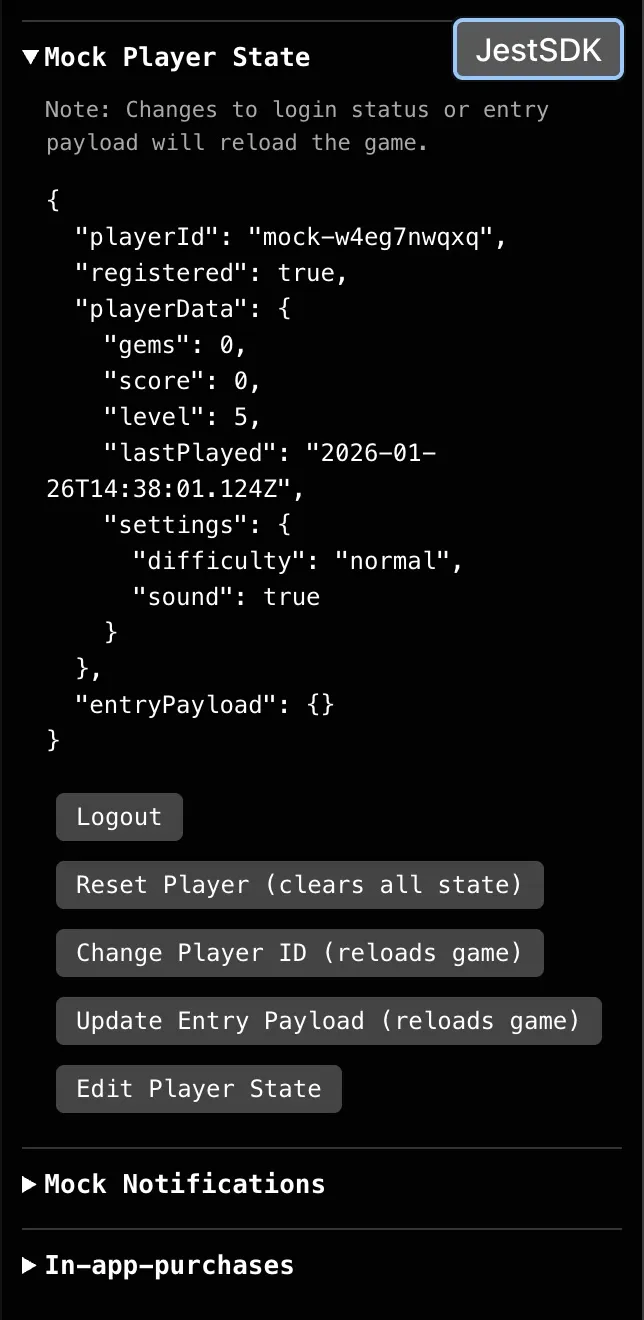
JestSDK debug menu showing mock user state
Initialize the SDK normally and wait for it to be ready before calling other methods. See SDK initialization.
Good for
- Iterating quickly without needing a live platform environment
- Developing and debugging SDK-dependent UI flows (onboarding/login gates, entry payload handling, user-data-driven screens)
- Forcing edge cases on demand (logged out vs logged in, missing or invalid data, errors) to validate your handling
- Reproducing scenarios deterministically when debugging app logic that depends on platform state
Not good for
- Validating real platform behavior and configuration (auth/login UX, real user identity, product configuration, notification delivery)
- Catching issues that only appear inside Jest.com (embedding, redirects, permissions, platform UI interactions)
- Measuring production-like performance, latency, or reliability
- Getting end-to-end confidence that your uploaded build works on Jest.com
- Verifying signed SDK responses on your backend. Local mocks return placeholder signed values, such as
"JWS"forpurchaseSignedandpurchasesSigned. Use the Simulator's signing configuration or sandbox users for signature-verification testing.
Use mock mode for day-to-day development, then validate on Jest.com with the hosted emulator and sandbox users.
Test purchases
Use the JestSDK → In-app-purchases section to exercise the success, cancel, and error branches of your purchase flow. Begin Purchase Response and Complete Purchase Response control the outcomes of the two calls independently.
- The returned
purchase.productSkuis the SKU you passed toJestSDK.payments.beginPurchase({ productSku }), so the same SKU-matching logic you ship to production works in mock mode. - When that SKU is in the mock product catalog, the purchase carries that product's price and currency; otherwise it falls back to a placeholder price.
- The purchase comes back incomplete (
completedAtisnull). Grant the item, then callJestSDK.payments.completePurchase({ purchaseToken })yourself.
These examples use the HTML5 method names; see Payments for the Unity equivalents.
Test purchase recovery
- Open JestSDK → In-app-purchases → Edit Products and put the product you want to recover first in the mock catalog.
- Set Mock Incomplete Purchase to ON and choose a Complete Purchase Response.
- Run your app's recovery logic so it calls
JestSDK.payments.getIncompletePurchases(), grants the returned item, and attempts completion. - Switch Mock Incomplete Purchase to OFF to test the empty response.
While the toggle is on, each recovery call generates one incomplete purchase with a new token, using the first catalog product's SKU, price, and currency. An empty catalog uses placeholder values. With the toggle off, the call returns an empty list. Both responses have hasMore: false.
The local mock does not keep a purchase ledger: a successful checkout is not added to the recovery response, and completing a purchase does not change the toggle or remove the synthetic purchase. The toggle starts off again after a page reload, so run the recovery logic after enabling it in the current session. Use sandbox users to validate recovery of persisted purchases across sessions.
Test screenshot capture
In the JestSDK debug menu, Screenshots is collapsed by default. To check your game's screenshot integration:
- Open the JestSDK button in the top-right corner.
- Expand Screenshots.
- Click Capture Screenshot to preview the returned image.
The capture calls the function registered with JestSDK.social.setScreenshotProvider();
without a provider, it captures the game's main canvas. A provider that returns
null or throws shows an unavailable or error state, without falling back to the
canvas. If the game does not respond within 10 seconds, the capture times out.
This checks local capture only. Test platform sharing on Jest.com, where the real sharing flow and platform permissions are available.