Payments
We will soon be deprecating credits for product purchases.
Prices will be specified by price and currency properties.
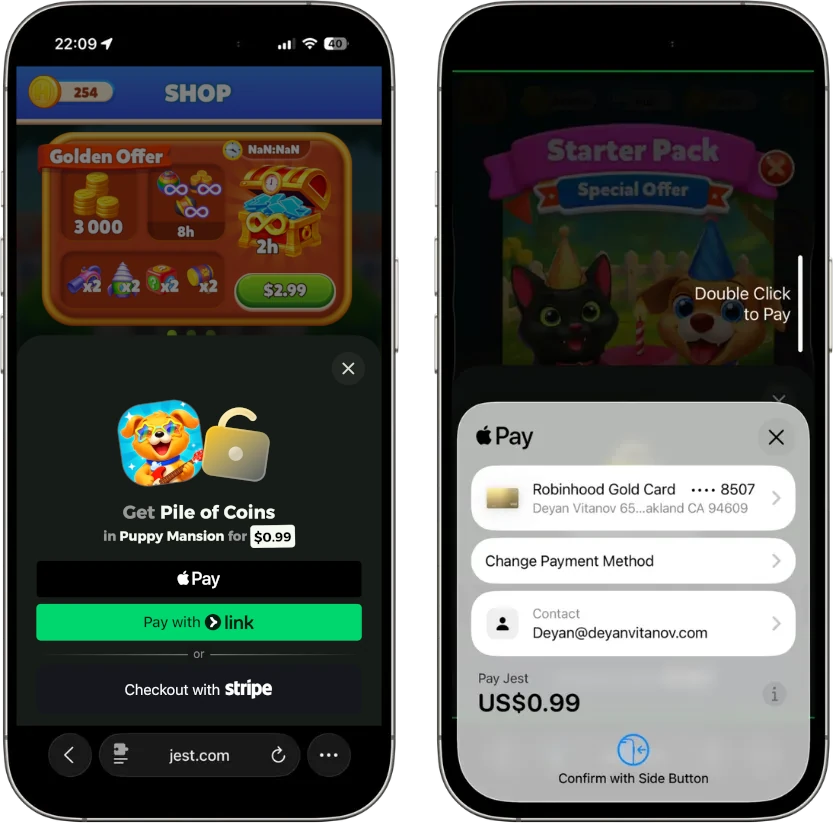
The Jest platform allows developers to sell in-game products using the Payment SDK methods. We enable these transactions primarily through popular digital wallets, such as Apple Pay and Google Wallet. Jest handles the entire checkout process with the player, while your game is responsible for granting the purchased items and confirming the purchase.
Pricing
Players purchase in-game products in USD on the Jest platform.
As a developer, you define the products and USD prices available in your game. When your game calls begin_purchase, Jest handles checkout end-to-end with the player.
When using a sandbox user, players see real product prices in the game UI, but the platform checkout modal makes clear that no charge will be made. The resulting JestPurchase records 0 in both price and credits (deprecated), and carries sandbox = true so you can recognize a test purchase without inferring it from the price. See Recognize sandbox purchases.
Purchase lifecycle
A purchase represents a single successful checkout of a product by a specific player.
- Display available products to the player (via
get_products()). - Start checkout by calling
begin_purchase(sku). - If checkout succeeds, the SDK returns an incomplete purchase containing a
purchase_token. - Grant the purchased item in your game, then confirm the purchase by calling
complete_purchase(purchase_token). - Until completed, the purchase remains incomplete and will continue to be returned by
get_incomplete_purchases()(for example, after a crash).
Checkout cancellation and error handling are managed by your game; see Start a purchase (begin_purchase) for details.
Happy path (checkout succeeds)
Recovery (startup reconciliation)
If checkout succeeds but the game crashes, loses connectivity, or is closed before complete_purchase is called, the purchase remains incomplete. The platform will keep returning it via get_incomplete_purchases() until you confirm it.
If has_more is true, continue fetching until all incomplete purchases are processed.
How to use the SDK
Payload shapes
Where the SDK references JestPurchase, it contains:
| Property | Type | Description |
|---|---|---|
purchase_token | String | Required to call complete_purchase. |
product_sku | String | The product purchased. |
credits | float | (Deprecated, use price and currency instead) Total USD value |
created_at | int | Unix timestamp (ms since epoch) when the purchase was created. |
completed_at | int | Unix timestamp (ms since epoch) when confirmed; 0 until confirmed. |
estimated_revenue | float | The (estimated) USD share of revenue from this purchase the publisher receives. |
price | float | The purchase price in the currency specified in currency |
currency | String | The currency code (ISO 4217) the price is in |
sandbox | bool | true only for sandbox-user or simulator purchases; false otherwise. |
Set up products
Set up and price products using the Jest Developer Console.
For more information, see Manage products.
List products (get_products)
To retrieve the products available for purchase in your game, call get_products.
var payment = JestSDK.payment
var products = await payment.get_products()

for product in products:
    print("Product: %s (%s) - %s %s" % [product.name, product.sku, product.price, product.currency])
Products include the following information:
| Property | Note |
|---|---|
sku | An identifier for the product, configured when set up in the Developer Console. |
name | The display name of the product that may be shown to the player during checkout. |
description | Short description of the product that may be shown to the player during checkout. |
price | Product price in the currency specified in currency |
currency | The currency (ISO 4217 code) the price is in |
Displaying prices
The way product prices are displayed should be based on the price and the currency.
currency is an ISO 4217 which can be used to select the correct currency symbol or formatting.
Start a purchase (begin_purchase)
Call begin_purchase with the sku of a product returned by get_products().
The method returns a JestPurchaseResult with one of the following outcomes:
Success
status == JestPurchaseResult.Status.SUCCESSwithpurchaseandpurchase_signedpopulated. Checkout completed successfully. The returned purchase is incomplete and must be granted and confirmed by your game.
Cancellation
status == JestPurchaseResult.Status.CANCELEDThe player canceled the checkout flow.
Error
status == JestPurchaseResult.Status.ERRORwitherrorcontaining one of:internal_error- A transient error occurred. Your game may retry the purchase.invalid_product- The requestedskuis not available for purchase. Do not retry with the samesku.
var payment = JestSDK.payment
var result = await payment.begin_purchase("gems_100")

if result.status == JestPurchaseResult.Status.CANCELED:
    # Handle cancellation with UI feedback
    return

if result.status == JestPurchaseResult.Status.ERROR:
    print("Purchase failed: %s" % result.error)
    # Handle the error with different product or a retry
    return

# status == SUCCESS
var purchase = result.purchase
var purchase_signed = result.purchase_signed
print("Purchase successful: %s" % purchase.product_sku)
Grant and confirm a purchase (complete_purchase)
When begin_purchase returns SUCCESS, your game must:
- Grant the purchased product to the player.
- Confirm the purchase by calling
complete_purchase(purchase_token).
Until complete_purchase is called, the purchase remains incomplete and will continue to be returned by get_incomplete_purchases().
Only call complete_purchase after you have durably granted the purchase (for example, your backend has verified the signed data and recorded the grant). If you confirm first and then crash before granting, get_incomplete_purchases() cannot recover the purchase because it's already confirmed.
# Recommended: send purchase_signed to your backend to verify and grant
await verify_and_grant_purchase_server_side(purchase_signed)

# Only confirm after the grant succeeded
var complete_result = await JestSDK.payment.complete_purchase(purchase.purchase_token)

if not complete_result.ok:
    if complete_result.error == "internal_error":
        # Retry later. Leaving the purchase incomplete is safe.
        pass
    else:
        # invalid_token: don't retry with the same token.
        pass
complete_purchase returns a JestResult:
- Success (
ok == true). - Error (
ok == false) witherrorbeing:internal_error: a transient error occurred; retry.invalid_token: the token is not valid (already confirmed, wrong player, etc.); don't retry with the same token.
If you have a backend, treat purchase.purchase_token as an idempotency key and store it so you never grant the same purchase twice, including during retries or recovery flows.
Recover incomplete purchases (get_incomplete_purchases)
Your game must check for incomplete purchases every time it starts. This is what makes purchases resilient to crashes, power loss, and network failures between a successful checkout and complete_purchase.
var payment = JestSDK.payment
var has_more = true

while has_more:
    var result = await payment.get_incomplete_purchases()

    if not result.ok:
        break

    # Recommended: send purchases_signed to your backend to verify and grant
    await verify_and_grant_purchases_server_side(result.purchases_signed)

    for purchase in result.purchases:
        var complete_result = await payment.complete_purchase(purchase.purchase_token)

        if not complete_result.ok:
            if complete_result.error == "internal_error":
                # Retry later. Leaving it incomplete is safe.
                return
            # invalid_token: don't retry with the same token.

    has_more = result.has_more
The response is capped (currently 50 purchases per call). If has_more is true, confirm the returned purchases and call again until it is false.
Recognize sandbox purchases
Purchases made by a sandbox user, and purchases driven from the Developer Console simulator, carry sandbox = true. The field is false on real purchases, so purchase.sandbox is the check, and it travels inside the signed token too — your backend can trust it after verifying the signature.
Sandbox purchases are also priced at 0; simulator purchases keep the price you configured, so the flag is the only reliable signal there.
var payment = JestSDK.payment
var result = await payment.begin_purchase("gem_pack")

if result.status == JestPurchaseResult.Status.SUCCESS:
    var purchase = result.purchase

    # Grant either way; only the bookkeeping differs.
    grant_item(purchase.product_sku)

    if not purchase.sandbox:
        report_revenue(purchase.price, purchase.currency)
Grant the item either way — that is what makes the sandbox useful for testing your full purchase flow. Use the flag to keep test traffic out of anything that counts real money: revenue analytics, leaderboards of top spenders, lifetime-value models, or payouts.
Signed purchase data (JWT)
The begin_purchase and get_incomplete_purchases methods return purchase data in two forms:
- As objects (
purchase/purchases) for convenience. - As signed tokens (
purchase_signed/purchases_signed) in the form of a signed JSON Web Token (JWT).
The data inside the signed token is equivalent to the plain object. For critical actions such as granting items or crediting accounts, you must only trust the signed token after verifying its signature.
For server-side verification examples and details, see the HTML5 SDK Payments documentation.
Failure to verify the signed token can leave your game vulnerable to exploitation.